
Internet Explorer is still accessible in Windows 11, here's how to run it – Ghacks

Microsoft ended support for Internet Explorer on June 15, 2022. But the legacy browser can still be accessed.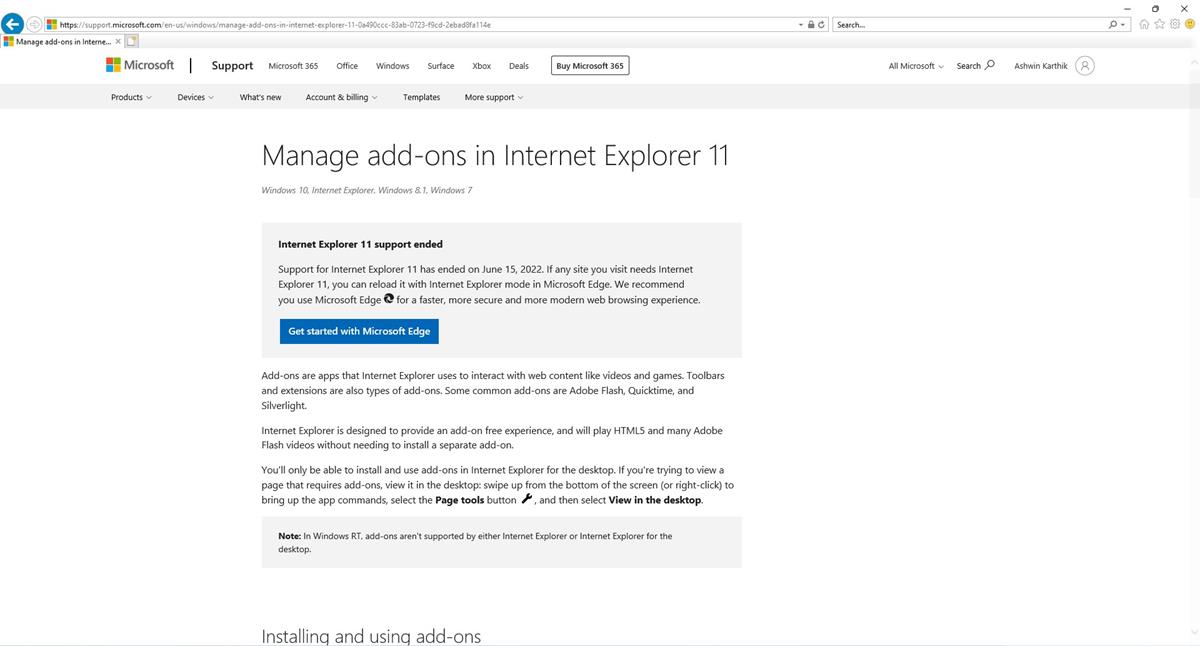
While the browser has been retired in Windows 10 and 11, Microsoft will only end support for Internet Explorer in 2023.
Circling back to the topic at hand, you can’t access Internet Explorer directly. Using its shortcut opens Microsoft Edge, and if you try searching for Internet Explorer in the Start Menu, it displays Edge as the modern experience.
A user discovered a way to open IE and shared the steps online. I thought it was just a prank, but surprisingly it works.
1. Open the Start menu, and search for Internet Options.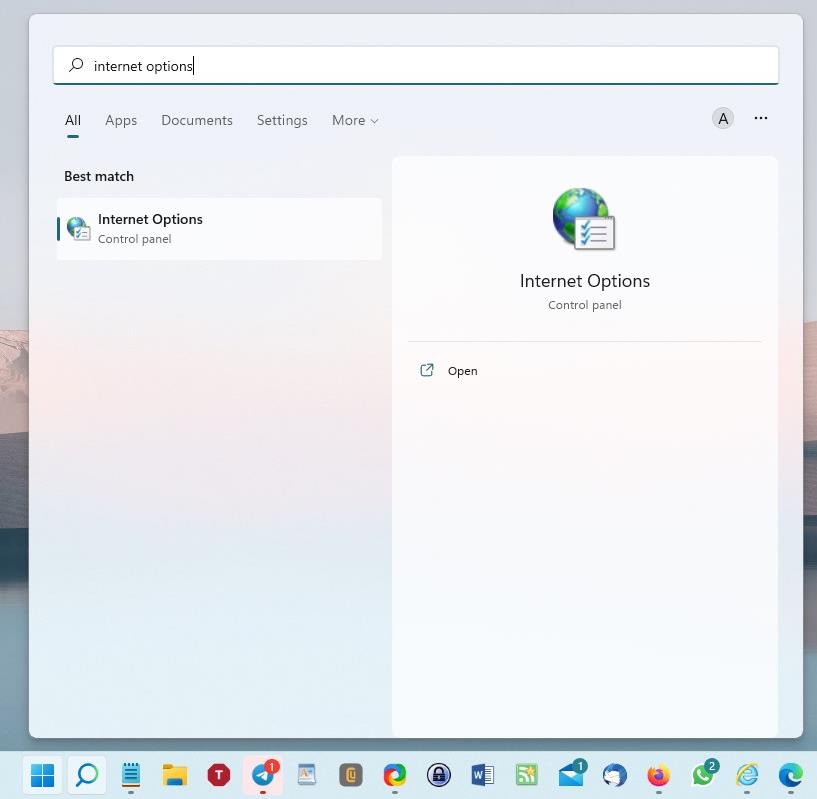
2. Click on the option that appears. The Control Panel applet for Internet Properties should open.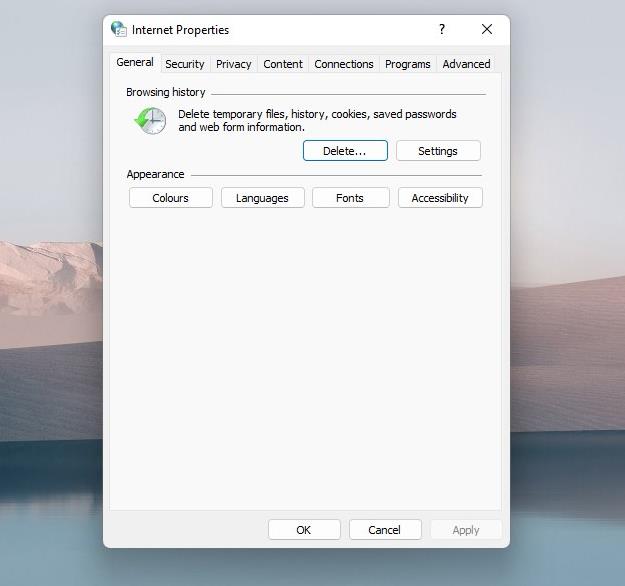
3. Switch to the Programs tab.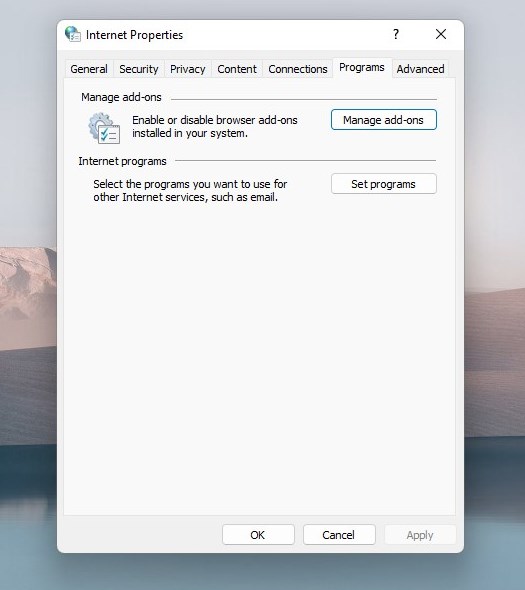
4. Hit the button that says “Manage add-ons”.
5. A new window will open. It has some clickable text near the bottom left corner.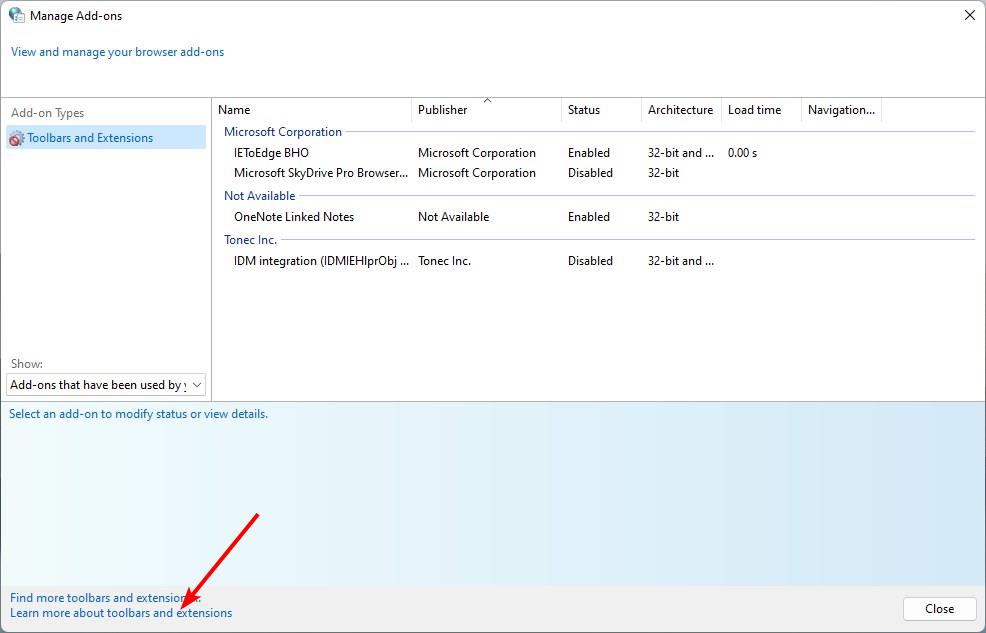
6. Click the one that says “Learn more about toolbars and extensions”
7. An Internet Explorer window will open.
It loads a Microsoft support page for the option you clicked. The important point here is that it is fully functional. You can use it to open tabs, visit websites, etc. I wouldn’t really recommend using it even for casual browsing, because the program is really outdated, and is vulnerable to security issues. But, if you are interested in more of a nostalgic experience, than a usable browser, the above steps may help you run IE in Windows 11.
TheVerge reports that this method works in Windows 11, but I think it should work in Windows 10 too. It is after all a legacy applet that is present in older versions of the operating system. I tried pinning the opened window to the taskbar, but the Internet Explorer shortcut that it created just opens Microsoft Edge.
As a matter of fact, the company has been working on replacing the Control Panel entirely with the Settings app since Windows 10 made its debut in 2015. But, lately, the Redmond company has made some progress, by adding key features such as app management to the Settings app. This is the equivalent of the Programs and Features applet in the legacy app. So there is a good chance that this trick to run IE could go poof in the future along with Control Panel. But, since IE poses a security risk for its users, it is very likely to be patched by Microsoft quickly.
If you want to visit old websites that only work with IE, you can use Microsoft Edge’s Internet Explorer mode. You will need to enable this feature first.
Open the Menu and click on the Settings button. Switch to the section for Default Browser, it has a few options. Look for the one that says “Allow sites to be reloaded in Internet Explorer”. It is set to its default value, i.e. Don’t Allow. Click the drop-down menu next to the label, and set it to Allow. Restart Microsoft Edge, and try visiting the page that you wanted to visit in IE, it should load properly in Edge.
I don’t think you should share “how to do stupid stuff” on your pc.
It’s now possible that someone will get hacked as a direct result of you sharing this information on this website.
In needed to open an FTP site yesterday on Windows 11.
Tried iexplore. Gave up and used a Windows 10 computer instead.
So Microsoft lied, because stated that IE has been removed from the operating system (Windows 11). Or I misunderstood what told Microsoft told?
It can never fully be removed. There are ton of things that still require it.
@ piomiq,
> So Microsoft lied
Are you really surprised? I mean, come on, this is ONE MICROSOFT WAY we’re talking about.
On 64-bit Windows Pro 10.0.19044.1865 (the current version), I can still launch IE, and then use it to launch a website, by typing the command iexplore into the RunBox. I still have the resulting shortcut, not that I ever use it anymore.
But I have a QUESTION: When IE does finally disappear, how will we import all our multiple bookmarks files, with their folder structure, into our other browsers?
Please click on the following link to open the newsletter signup page: Ghacks Newsletter Sign up
Ghacks is a technology news blog that was founded in 2005 by Martin Brinkmann. It has since then become one of the most popular tech news sites on the Internet with five authors and regular contributions from freelance writers.