
Gift Idea From 1969: A Kitchen Computer – Hackaday

The end of the year is often a time for people to exchange presents and — of course — the rich want to buy each other the best presents. The Neiman Marcus company was famous for having a catalog of gift ideas. Many were what you’d consider normal gifts, but there were usually extreme ones, like a tank trunk filled with 100,000 gallons of cologne. One year, the strange gift was authentic Chinese junk complete with sails and teak decks. They apparently sold three at $11,500 (in 1962 money, no less). Over the top? In 1969, they featured a kitchen computer.
Wait a minute! In 1969, computers were the purview of big companies, universities, and NASA, right? Well, not really. By that time, some industrial minicomputers were not millions of dollars but were still many thousands of dollars. The price in the catalog for the kitchen computer was $10,600. That’s about $86,000 in today’s money. The actual machine was a Honeywell 316, based on one of the computers that helped run the early Internet.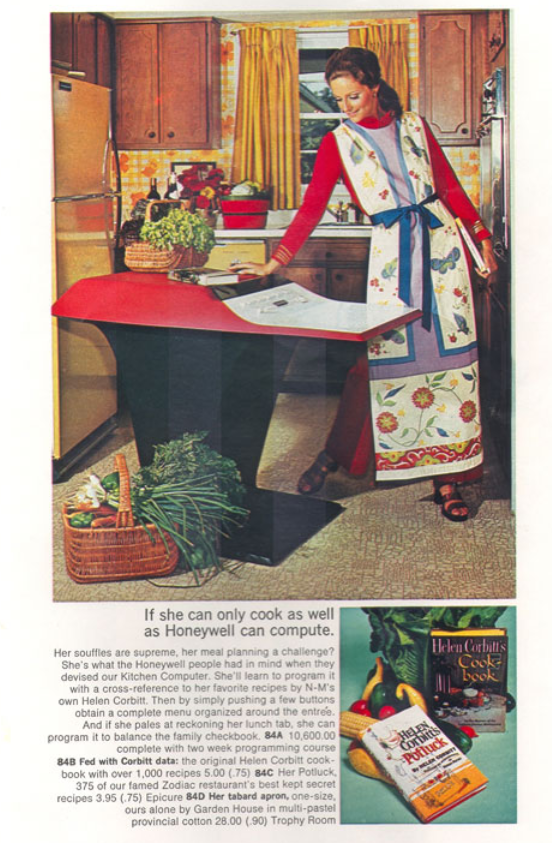 It isn’t entirely clear if the company really thought they would sell one and — as far as anyone can tell — they didn’t. The machine came with a two-week training class to learn how to program the machine and with no real screen, we aren’t entirely clear how it worked. According to Earlycomputers.com:
The computer used binary code, so if Mom wanted to plan a dinner around some nice steak that she had just bought, she would need to enter the binary code for steak:
01110011011101000110010101100001011010110000110100001010.
And even if she managed to do that correctly, the output from the computer was displayed as a series of lights that “spelled out” the answer in binary code. Imagine eight small lights in a row and if they were on it would be read as a “1” and if it were off it would be read as a “0”. There is mention of a teletype machine that had a typewriter keyboard and would make the interface easier but that doesn’t seem to be included in price of the computer.
Best guess? We think you keyed in some recipe ID number and how many servings you wanted. Then the computer would give you codes for each ingredient and the quantity: 1/4 cup per serving times 6 servings would somehow tell you 1 1/2 cups.
Hardware-wise, the over-100-pound machine used 16-bit words and had 72 instructions. The machine has 4 KB of magnetic core expandable to 16 KB and ran at a respectable 2.5 MHz. There isn’t much information about the actual machine, although plenty can be found about the actual H316. But you could tell it was a kitchen computer. Why? Because it included a built-in cutting board, something a stock H316 probably couldn’t claim. You can see the only known version that lives at the Computer History Museum in the video below.
It is hard to remember, but in those days and all the way up until sometime in the 1980s, we all predicted that computers would be in people’s homes. We just couldn’t agree on what they were going to do. Tracking recipes was a common suggestion. So was balancing a checkbook, something few people seem to do anymore. Programs like Visicalc and Wordstar sold businesses on computers, but the real killer application for people wound up being communicating with other people and businesses via the network. Sure, gaming, digital photography, digital video, and digital music also became popular, but remember that it has been fairly recently that personal computers have had the storage and horsepower to do a good job at many of those things.
Even today, though, most people don’t have a permanent computer in the kitchen for cooking. Sure, there are probably a few microcontrollers in your appliances. You might use a tablet, a phone, or a laptop to look up a recipe. But the idea of a recipe computer never really caught on.
Let’s face it, early computers didn’t look like they do now, even if they were personal. Ditto for what used to pass for a laptop.
Selling Chinese junk for Christmas…
Oh well, some things never change 😉
Santa’s been replaced by Amazon.
Or… Has Santa laid off all the elves, outsourced production to China, and contracted Amazon to do delivery/logistics? 🙂
I’m confused. What does any of this have to do with an $86,000 computer from 1969, made by Honeywell?
I dunno, why is it in the first paragraph
Did nobody read the first paragraph or is my wordplay just bad?
“One year, the strange gift was authentic Chinese junk complete with sails and teak decks.”
I think the author meant “the strange gift was AN authentic Chinese junk…” — as in a stereotypical Chinese boat called “a junk”
“That’s the joke”.
Yeah there is a missing an there lol. Can I blame Grammerly? Lol
We laugh but some remember when the Japanese had that reputation.
https://www.caluniv.ac.in/dj/BS-Journal/v-40/B-Singh.pdf
We laugh because the Chinese don’t have the social culture to adopt good quality control measures. There’s no incentive to do so under “democratic centralism” employed by the communist system.
First, there’s no free competition in a command economy. Secondly, the structure of the system means that people down the hierarchical ladder cannot point out faults or flaws in the works because it would “embarrass” their superiors, who in turn try to pin any faults on the people beneath for not following their orders correctly, or even “sabotaging” the business. It’s just a game of passing the blame around to avoid facing the consequences. Everyone I’ve talked with, who have worked in China and also in Russia and other present and ex communist states say it’s the same culture all over. The boss is the king, and the boss of the boss is god, and you just do exactly as you’re told and don’t question it or YOU get blamed for everything.
So people just give up and go through the motions, however ridiculous they may be. They may know very well that they’re making a mess of it, but it’s not their responsibility and not their problem.
In all fairness, I think it’s more complex than that, because in Japan there is also strongly hierachical thinking. Mistakes made in the Fukushima disaster were also blamed for the obedience mindset and having to face difficulties if speaking up.
Also while it might not be as bad in the West, the tendency to punish people deviating from the norm is increasing, alarmingly.
Feedback from all the food we bought would close the loop.
I.e. a methane detector?
Thermomix definitely found a way to make a recipe computer that makes sense
It’s still getting publicity over fifty years later.
I think the point was to draw attention. If someone really wanted the computer, they’d supply it, but it wasn’t likely. But people talked about it.
It was that year that I decided I wanted my own computer.
The “Kitchen computer” is a category that pops up from time to time when corporations try to invent a new product to push – like clockwork every few years – because whenever the old product design team retires or quits one by one, new people are brought in, eventually nobody remembers the bad ideas that didn’t sell.
Then someone thinks of the obvious: “Hey, what if we sold a computer for the kitchen, you know, for housewives to look up recipes and stuff like that – brilliant idea! Why isn’t this already on the market?”
It’s only the format that changes. In the 90’s they were weird looking java terminals, in the 00’s they were integrated into your fridge, in the 2010’s it was a tablet computer stuffed in a breadbox. Let’s see what new format they’ll pull off this decade – holographic projectors?
AR and AI (battle of the buzzwords) driven.
Don’t forget, it has to be built to a very low price point, such that the hardware is not capable of cashing in the promises of the software and it ends up unresponsive and difficult to use. It has to take at least a minute to boot up, and you shouldn’t be able to use any common software or apps – only a locked down version of an obscure web browser that is never updated. The display resolution should also be so low that you can only see half of a web page at once.
Otherwise it’s not a proper Kitchen Computer (TM).
Example from 1999
http://birdhouse.org/beos/byte/07-IPAD/
The promise was a machine called “iToaster” that was capable of displaying a cooking recipe from a web site, while playing an MP3 file, and an MPEG video about the recipe while also displaying another video screen of a baby monitor, on a $199 device back when you needed to add at least another zero to the price tag to pull everything off. Plus, you needed broadband access for it to work while people were still using analog modems or at best ISDN.
Sufficient to say, nobody has ever heard of it since.
My dad cooks to decompress from work so he spends as much time in his kitchen as he does in his office. He bought a small refurbished Dell workstation, the one where the monitor is mounted to the side of the case with a carry handle, and set it up on the kitchen counter. It does double duty as a recipe box and home automation controller.
Its not a bad setup if all you’re doing is looking up recipes and controlling your smart lights… Or want to yell at the talking news heads every morning while you make eggs. I’ve been after him to use it to keep an inventory on the fridge and pantry but we haven’t found a smooth enough method for updating items used vs remaining. Scales on the bulk and liquid items maybe?
Practical or not, that’s a sweet-looking computer.
Isnt that what a Lidlomix does. Heck yeah I love this machine great way to eat healthy meals as a student.
The Honeywell H316 was actually quite a capable minicomputer for machines of that era. We should not underestimate the late 1960s minicomputers, they had sufficient memory and processing power to take on the tasks and applications of desktop machines that appeared several years later.
The H316 was also the machine that Charles H. Moore developed the first commercial standalone implementation of Forth for the control of radio telescopes, when he joined the National Radio Astronomy Observatory NRAO in 1968. He had an early version of Forth running on an IBM 1130 at the beginning of 1968.
True but I’ll bet that was the rack mounted version not the Star Trek console version lol
Tell you which one I’d rather have in my kitchen.
Oh what geek doesn’t have a rack in his kitchen? 😀
True…
Wondering when the people in the refrigerator business, who seem to think we need a video display on the door of what’s inside, decide to add an IOT connection to some recipe server. (I don’t follow such time-wasting trends, so perhaps it’s already in existence.)
I remember back in the early ’90’s when working for EDS in the SF Bay Area that they were working on automating refrigerator “inventory” to automatically order from your favorite supermarket when supplies got low.
Over the years we tried ‘recipe’ programs for the PCs, but, here, it never caught on. The recipe ‘card’ box still fills that need and works well. So probably I won’t be installing an RPI (my choice) with a small touch screen in the kitchen 🙂 .
Nobody said it has to be a small touchscreen 😀
I put in an old 21″ kiosk display: https://www.bernieke.com/images/domotica/kitchen_screen_recipes.jpg
It runs my own recipes website (through a browser in kiosk mode on an rpi).
Which allows us to pick recipes (and quantities) from our phone or PC, which are then added to OurGroceries for during shopping and a weekmenu on the recipes site. Then in the kitchen you can look at the weekmenu, click on that day’s recipe and get it on the screen with the correct ingredient quantities.
Wingless turkeys. Last week it was no drumsticks chicken.The wonders of science and meat.
Resurrect the giant moa birds, drumsticks a meter long but no wings. We got the DNA.
One of the biggest problems I have using an iPad in the kitchen is the screen going to sleep while I am doing something else, and having to log back in each time.
The next biggest problem is putting it in a good location and reading angle.
(It’s my wife’s iPad, so it doesn’t unlock by my touch or whatever. )
Yeah, a 21 inch screen would be nice too!
There was a 19″ tablet/TV thing selling a decade ago for the kitchen, it claimed to have recipe database. But it was a lame reapplication of the slideshow mode in a kludge to early android/digital photoframe hard and software, in that it had a bunch of jpegs of recipes, not text searchable or anything, just in slideshow or swipe to browse mode.
Kudos to Joe Kim for the lead artwork.
My “recipe computer” is an X230, the water reistance helps. Also, the trackpoint mouse is easy to use with wet hands and the edge-to-edge keyboard saves counter space without sacrificing ease of use.
I’d rather have had the flying car.
Please be kind and respectful to help make the comments section excellent. (Comment Policy)
This site uses Akismet to reduce spam. Learn how your comment data is processed.
By using our website and services, you expressly agree to the placement of our performance, functionality and advertising cookies. Learn more