
These phishing email subjects get the most clicks – Ghacks

It is nearly impossible to block all phishing emails before they land in user inboxes; this is true for home users and company employees alike. While the bulk is filtered out, some emails manage to bypass filters to land in the user’s inbox.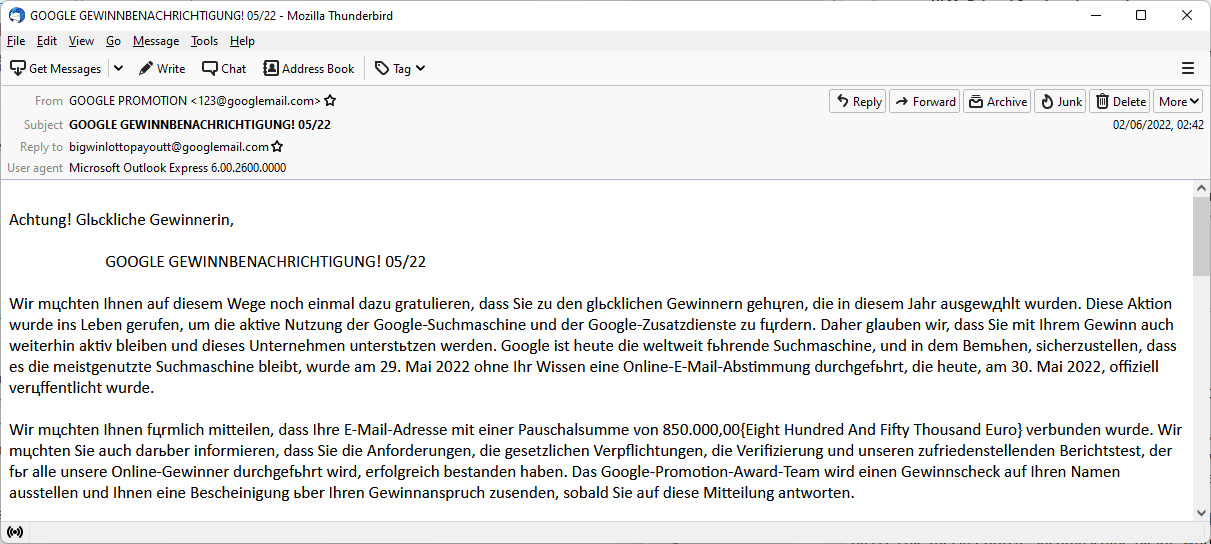
Users exposed to phishing emails react differently, and one deciding factor is the subject line of the email according to research published by Kaspersky.
While it is nearly impossible to run scientific tests in real world environments, phishing simulators come close to the real deal. Security companies and organizations may use phishing simulators in employee trainings.
According to data from Kaspersky’s Security Awareness Platform , subject lines that appear to be work or user related get the most clicks. System administrators may use Kaspersky’s platform to mimic phishing emails, track results and use the data to raise awareness among employees. Kasperksy’s study included results from over 29,500 employees from 100 countries.
Nearly one in five employees clicked on links in the the most effective fake phishing email: 18.5% of employees fell for the email with the subject “Failed delivery attempt – Unfortunately, our courier was unable to deliver your item”.
The following table lists the phishing emails with the highest clickthrough ratios.
Kaspersky notes that other subjects, including booking reservation confirmations, order placement confirmations, or IKEA contest announcements, have high clickthrough ratios as well.
Emails that contain threats or “instant benefits” had lower clickthrough ratings according to Kaspersky. Emails that claimed to have hacked a user’s computer and know the search history had a 2% clickthrough rating, while free Netflix offers and $1000 tricked only 1% of employees.
The difference may be partially explained by the work context in which the phishing simulation was carried out in. A Netflix offer may have more appeal to home users than employees. Similarly, threats that a computer has been hacked may weight more when it is a personal computer.
Kaspersky recommends that organizations intensify employee training to raise phishing email awareness. The teaching of basic phishing email signs, such as inconsistent sender addresses, suspicious links or dramatic subject lines, may weed out a good percentage of emails.
Well crafted phishing emails make it difficult to determine whether they are legitimate or not. Employees should contact the IT department when in doubt before opening the email or reacting to it.
Closing Words
It does not take a rocket scientist to come to conclude that phishing emails that users can relate to work best, but the click through numbers sound awfully high for this day and age. Phishing may lead to all sorts of issues, from planting malware in a company network to stealing authentication information and ransomware.
Now You: have you encountered phishing emails recently? How do you verify that emails are legit?
I haven’t encountered phishing emails recently, but I did at one time, long ago, never clicked because fortunately something had triggered suspicion : I sent then the email to Signal-Spam at [https://www.signal-spam.fr/] (account required) which confirmed the phishing status.
“Something had triggered my suspicion” : well, when the sender is a Scottish bank you’ve never dealt with, suspicion is obvious, far more than when the sender is the ‘Mail delivery service’ for instance, which is what I’d me the most likely to be caught by, as mentioned in the article.
As mentioned in the article as well, “the work context in which the phishing simulation was carried out in” is a major factor of awareness. Personally I’m only in a home user’s environment and am not submerged with emails, so it’s easier to spot exotic email senders and subjects. Otherwise, indeed, the human factor holds a major position in companies’ digital problems, be it phishing or whatever form of confidential data extortion.
I come across phishing emails regularly; most are plain obvious, even those that slip through protections. Some do better, but even those are easily identifiable on closer inspection, e.g., by checking link targets, seeing weird “reply-to” email addresses, and so on.
@Martin, I guess most of the phishing and spam emails you receive is sent to your publicly known email address(es), those, professional, attached to any journalist on the Web. Basic users are told and repeated to avoid displaying their emails but when you work on the Web of course one or several email addresses need to be publicly exposed. I’d bet your private email addresses are far less if not at all used for spam/phishing. Like movie stars, once you’re under the lights private life is tougher to preserve, when not a real challenge. I couldn’t endure that, I mean a crowd of paparazzi running after me as young ladies when I was younger, lol (that’s a joke, I’m too modest to admit it!). I was made to be a Bond, Tom Bond, far more than a movie star. There i went again, digressing.
Anyone else see the irony in the fact that a russian ‘security platform” has the capability to create phishing emails?
I get phishing emails nearly every day. Most land in the junk folder but a few make it through. Since Putin started murdering people in public instead of private, the amount has increased greatly.
They all go to my default adress though, which I have had for a very long time and I never use for anything I consider “private”.
Phishing simulators, that is. Several companies simulate phishing emails, not only Kaspersky. Not to mention honeypots. But I remain curious to know a phishing simulator’s protocol, how it is carried out. Should I ever receive a phishing email, dig and investigate to find out a “Don’t worry and sorry, we’re good guys simulating a phishing campaign, unfortunately it landed on you, nothing personal”. Like this hilarious French video where people end up accepting and doing anything they’re told and asked for on the account it’s for a sketch [https://piped.kavin.rocks/watch?v=qNuJfcF1G-c] :=)
Many moons ago I got an email at work on the company laptop from ‘Paypal’. I did not have a Paypal account so I did not open it … I sent the email onto our PC support dept., but heard nothing back. A few weeks later I got another email and this one was a final demand for payment on my Paypal account, so I took a walk down to PC support … they came across as uninterested and offered no advise, so I took it upon myself to block the sender (though when they have your email address they just use another ID if you block them). I sent an email to Paypal to inform them of the situation … they actually thanked me!. The PC Support group never sent out any guidelines the entire time I worked there about phishing emails, but the ‘conditions of employment’, which we all had to sign annually, did state that employees must practice safe and secure internet habits – not sure if that meant one could be fired for not doing so. Maybe PC Support has since got their act together – I’m retired!
Please click on the following link to open the newsletter signup page: Ghacks Newsletter Sign up
Ghacks is a technology news blog that was founded in 2005 by Martin Brinkmann. It has since then become one of the most popular tech news sites on the Internet with five authors and regular contributions from freelance writers.