
Vivaldi 5.5 ships with Task Panel and account improvements – Ghacks

Vivaldi released a new version of its stable Vivaldi browser a moment ago. Vivaldi 5.5 introduces a Task Panel in the sidebar, makes setting up accounts in Mail and Calendar more comfortable, and improved address field performance.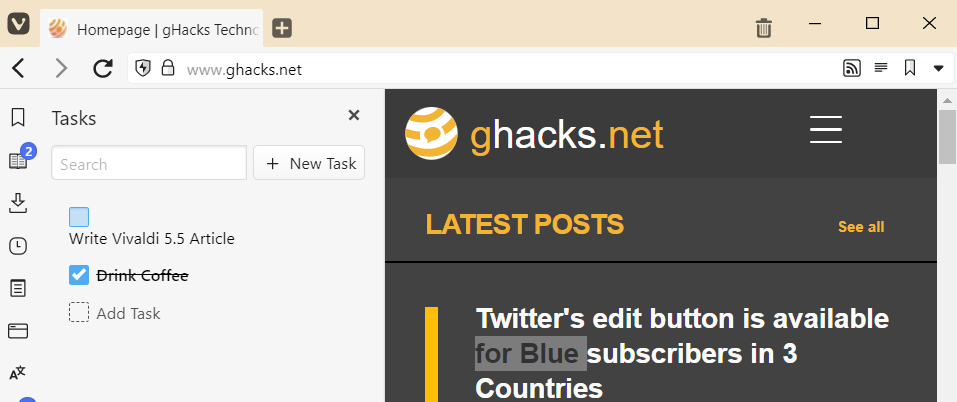
Vivaldi 5.5 is available for download on the official Vivaldi website. If you have Vivaldi installed already, you may select Vivaldi Menu > Help > Check for Updates to download and install Vivaldi 5.5 on the system.
The main new feature in Vivaldi 5.5 is called Tasks. It is available in the browser’s sidebar and linked to the browser’s Calendar feature. If you don’t have a Calendar account yet, you are prompted to create one; an option to use the Calendar locally only is available.
Once done, new tasks may be added with a click or tap. You may set a due time and reminders for tasks, add descriptions, location information, and configure repetitions. All of these are optional, with the exception of the description, as it acts as the title in the Tasks listing.
Tasks can be finished at any time with a click on their checkbox. These tasks are hidden by default, but checking the “show completed tasks” option in the sidebar reveals them again. Users with lots of tasks may use the built-in search to find specific tasks quickly.
Vivaldi users may enable the Tasks panel at any time in the Vivaldi Settings under Calendar > Enable Mail, Calendar and Feeds.
All tasks appear in the browser’s built-in Calendar. Tasks with due dates are found at the specified date, tasks that are open ended are found in the Agenda view.
Speaking of Mail and Calendar, Vivaldi improved the onboarding process for the two features. The main goal was to improve the setup process. Several services that required the input of information when setting up Mail and Calendar accounts, retrieve the information automatically now in the new Vivaldi release.
All it requires is that Vivaldi users enter the email address and account password to set up these accounts. It is a much faster process that requires less user interaction.
Vivaldi Mail’s warning feature for potentially forged mails was improved in the new release as well. Vivaldi displays a warning message when from and reply to email messages are not identical.
Vivaldi engineers improved the browser’s address field performance in the new release. Especially users who type fast should see a noticeable difference in performance when using the address field of the browser.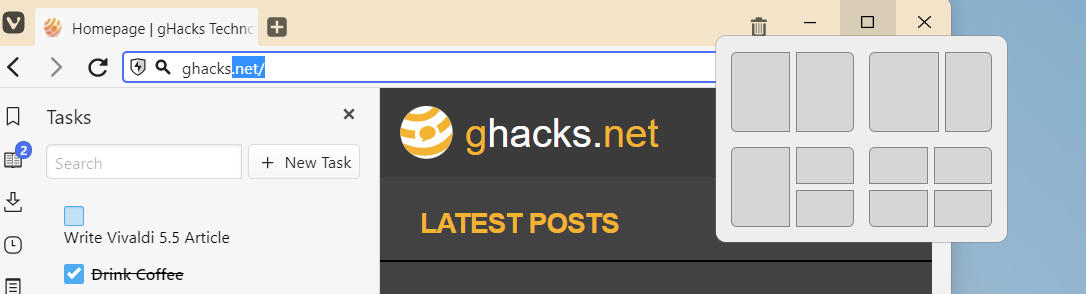
On Windows 11, Vivaldi got support for the Snap Layout feature of the operating system. Just hover the mouse over the maximize icon in the Vivaldi interface to see the available layout options. Microsoft improved Snap Layout in the Windows 11 2022 Update by adding full keyboard and touch support to the feature.
Closing words
Vivaldi 5.5 adds another nice to have feature in the form of tasks, improves the performance of the address bar, mail and calendar onboarding, and more.
Now You: what are your favorite Vivaldi features?
Yay, new apps coming to Vivaldi OS!
What’s best, Vivaldi or Brave?
It depends. If you want a highly customizable browser with lots of features built-in, you may want to check out Vivaldi first. If you want a browser that is more barebones, but with a solid content blocker and some interesting privacy features, you may want to try Brave first.
If you want to tinker around with a million settings and use the internet with a very mediocre adblocker, choose Vivaldi. If you want to use the internet, choose Brave. Oh and more importantly, the orange lion looks way cooler than a V.
While I can replace Brave with any other browser with uBlock (in fact I did), I’ve never found a browser to replace Vivaldi configured with ONLY the features I need. That pretty much made my mind to use Vivaldi and never looked back.
Ever more ridiculous bloat. The moment I need a car with a built-in lawn mower and kitchen sink, I will consider Vivaldi.
pffft! tasks… better enhance the adblocker!
Yeah, let’s focus on anything else except the adblocker or the manifest V3 thing. Anything but that. Let’s come up with even more totally useless garbage that has nothing to do with browsing the web. Why don’t you already include an egg timer, exercise reminder with a buzzer and flashing lights, disk partitioning/OS migrating tool and a linux emulator? I know you want them. Vivaldi should team up with that guy who makes Makulu Linux, you clearly would get along perfectly.
Vivaldi introduces new features all the time.
But they are most often optional and quite reliable.
Always use uBlock Origin on all browsers tested (even Brave).
It is the best!
Sync feature for present situation with Vivaldi is impeccable!
Can’t say the same for Brave…
When will be implemented vertical tabs (tree form) like Tree Style tab coming from Firefox?
Please click on the following link to open the newsletter signup page: Ghacks Newsletter Sign up
Ghacks is a technology news blog that was founded in 2005 by Martin Brinkmann. It has since then become one of the most popular tech news sites on the Internet with five authors and regular contributions from freelance writers.