
What is Computer RAM? – groovyPost

One of the essential components in your PC, Mac, and smartphone is RAM. What is RAM exactly? This guide will explain everything.
When you buy a computer, some key specifications are usually listed. These include the type of CPU and GPU, the clock speed, the size of the hard drive or SSD, and the amount of computer RAM.
What is RAM, exactly? What does it do, how does it work, and how much of it do you really need? How can you find out how much RAM your computer currently has? Keep reading to find out the answers to all of these questions and more.
RAM stands for Random Access Memory. You can think of it as the short-term memory in your computer. It stores the data that your PC needs for any currently active apps and processes. RAM allows those apps and processes to access this data as quickly as possible to avoid possible slow-downs.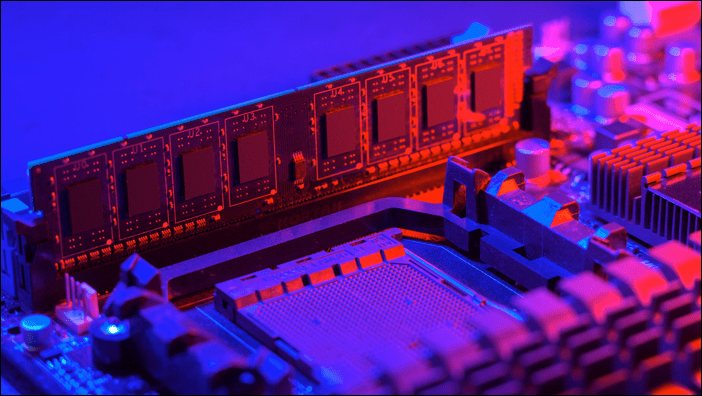
The name is a hangover from the days of storing data on magnetic tape. With this type of serial memory, to access the data you need, you would have to go through all of the data on the tape in order until you reached the section that you need. RAM allows you to read and write to any part of the memory at any time, which is why it is described as random access. It means you get roughly the same read and write speeds no matter where the information is stored.
RAM is different from your hard drive because it requires power to hold information. Once you turn your computer off, any information stored in RAM is lost. With a hard drive, the information remains stored even when you power down your computer.
If you’ve ever lost information from a document you were working on because your computer crashed, it’s because the data for your document was being stored in RAM. Once the power went out, all of that information was lost. Saving your document moves it from RAM to your hard drive, where it will remain stored even if you lose power.
The purpose of RAM is to store all the data that is needed by your currently running apps and processes. When you start your computer, data is moved from permanent storage on your hard drive to RAM. Your CPU can then access the data it needs from RAM far more quickly than it could from your hard drive.
Imagine you want to draw a rainbow. Rather than going back and forth to the large collection of colored pencils that you keep in the cupboard, you only take the colors that you need and put them in a pot in front of you. They are temporarily moved from your permanent storage (your hard drive) to a temporary storage area that you can access more quickly (RAM).
As you draw, you can quickly grab the next color from the pot in front of you. The pot (your RAM) holds everything you need for the current task in easy reach. When you’ve finished your work, you can return all of the pencils from the pot back into their case for permanent storage (your hard drive).
There are two main types of random access memory. These include static RAM (or SRAM) and dynamic RAM (or DRAM).
Dynamic RAM is made up of capacitors that are used to store bits of data (ones and zeros) by either holding a charge or lacking charge. Since these capacitors leak over time, the charge must constantly be refreshed or the information would be lost.
Static RAM uses transistors to store bits of data, instead of capacitors. The transistors act like a switch with an on or off position representing the ones and zeros. These switches don’t need continual refreshing like the capacitors in DRAM.
However, SRAM requires multiple transistors to store each bit, so SRAM chips are usually larger and more expensive than the equivalent amount of DRAM.
Since RAM is used to store the data you need for the processes you are currently running, the amount of RAM you will need will depend on how you are using your computer. Running a complex 3D game, for example, will require far more RAM than browsing the internet. You will also need more RAM if you regularly have multiple tasks running simultaneously.
As a general rule of thumb, the amount of RAM you’ll need is as follows:
This information is true at the time of publication.
If you have less than 8GB of RAM, you should still be able to use your computer for everyday tasks. You might find that it starts to struggle if you open multiple tabs in your browser or use photo or video editing apps, however.
The beauty of RAM is that it is possible to add more—if your PC allows you to. It’s not possible to install more RAM on some computers, however. Modern MacBooks, for example, don’t allow you to install more RAM yourself.
If you’re not sure how much RAM you currently have in your computer, it’s simple to find out.
If you’re a Windows user, it’s easy to see how much RAM you currently have installed. You can do this in a number of ways, but the simplest way to see the amount of RAM installed is through the Settings app.
To find out how much RAM you have on Windows:
You can find out how much RAM you have in your Mac computer in just a couple of clicks. You’ll also be able to see whether your RAM is upgradeable or not.
To find out how much RAM you have on Mac:
What is computer RAM? Hopefully this article has given you some insight into what RAM is, why it’s important, and how much you need for your computer.
RAM is just one of the key components of your computer and upgrading the RAM alone may not be enough if the other components aren’t up to speed. You will also need to ensure that you have a powerful enough CPU for your needs. You may also need a good GPU if you’re planning on using your computer for gaming.
Your email address will not be published. Required fields are marked *
Public profiles on Snapchat give you greater exposure and the chance to reach more users. Here’s how to make a public profile…
If you need to transfer your Windows 11 product key or just need it to do a clean install of the OS,…
Backing up your data to the cloud via an automated service is critical. Backblaze is the solution I use and recommend. Here’s…
Chrome does an excellent job of storing your browsing history, cache, and cookies to optimize your browser performance online. Hers’s how to…
Buying in-store doesn’t mean you have to pay higher prices. Thanks to price-matching guarantees, you can get online discounts while shopping in…
Copyright © 2007-2021 groovyPost™ LLC | All Rights Reserved